
Adviser Portal FAQs
Having problems accessing our Adviser Portal? We have compiled a series of our most Frequently Asked Questions (FAQs) to give you the support you need to view your clients' SIPP information and documents.
Getting Started
What is Dentons Adviser Portal?
The Dentons Adviser Portal is a secure view-only online platform that lets you access information about each client’s SIPP. Through the Adviser Portal, you can:
- View your Dashboard which provides a simple overview of all your SIPP clients and their Default Cash Account Balance
- See an overview of all assets held within each client’s SIPP
- Check the benefits your clients have taken, including when and how often
- Review your clients’ Contributions and Transfers to help assess carry forward opportunities
- Access and download key SIPP documents, including statements, pension payslips and more
- View additional client details, such as Lifetime Allowance protections and Expression of Wishes status
- View the Pension Administrator for your clients
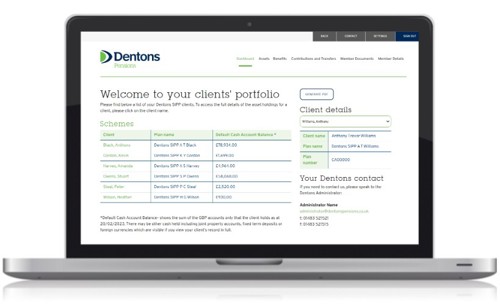
The Adviser Portal is designed to make your SIPP clients’ information more accessible, simple, and secure.
Next steps
Once your Adviser Portal access has been created, you will receive two emails from Dentons Pensions containing your Adviser Portal login details.
How do I get access to the Adviser Portal?
Access to your Adviser Portal is automatically set up when your client’s SIPP has been established.
You will receive two encrypted emails, with one containing your temporary username and one containing your temporary password, ensuring only you can access your clients’ SIPP information
Next steps
If you have not received two emails from Dentons with your portal details, please check your spam or junk folder, but please note it can take a few minutes at busier times, or contact us via enquiries@dentonspensions.co.uk.
Logging into the Adviser Portal
How do I login to the Adviser Portal?
To login:
1. Go to Dentons Adviser Portal page positioned in the top right-hand corner of the Dentons Pensions website
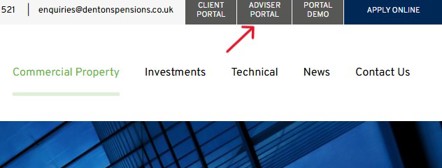
2. Enter your username
3. Enter your password
You will then be logged in and will see your Dashboard where you can view your clients’ SIPP information.
Next steps
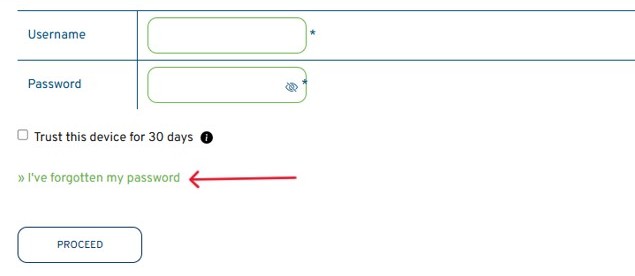
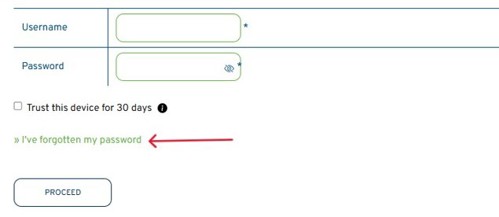
If you experience issues logging in, you can use the I’ve forgotten my password link on the sign in page.
I have forgotten my password, what should I do?
If you forget your password, you can easily reset it online.
1. Go to the Adviser Portal login page
2. Click “I’ve forgotten my password”
3. Enter your registered email address
4. You will be sent an email with instructions to reset your password
Next steps
If you do not receive the reset password email, please check your spam or junk folder, but please note it can take a few minutes at busier times.
If you still have not received the email, please contact us via enquiries@dentonspensions.co.uk.
Using the Adviser Portal
What can I do in the Adviser Portal?
The Adviser Portal allows you to securely view your clients’ SIPP information.
You can typically:
- View your Dashboard - a simple overview of your clients’ SIPP information and their Default Cash Account Balance
- See an overview of assets held within each client’s SIPP
- Check what client benefits have been taken, including when and how often
- Review Contributions and Transfers to help assess carry forward opportunities
- Access and download key SIPP documents, including statements, pension payslips and more
- View additional client details, such as Lifetime Allowance protections and Expression of Wishes status
- View the Pension Administrator for your clients
The Adviser Portal is designed to make your SIPP clients’ information more accessible, simple, and secure.
Next steps
Login to explore your clients’ SIPP information and other areas of the Adviser Portal.
How do I view and download my clients’ documents?
All documents that are sent to your clients by Dentons can be found in the “Member Documents” section, as highlighted in the image below:

Once you have clicked on the “Member Documents” tab, you will see a dropdown menu of options:
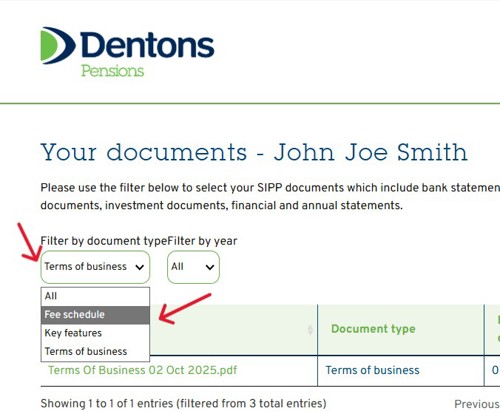
By default, you will see our Terms of Business. You can use the filter to select the documents you wish to view such as Fee Invoices, Annual Statements and Bank Account statements.
You can download documents by simply clicking on the document title you wish to view.
Authorised Access
Who is given access to the Adviser Portal for a client’s SIPP?
Access to the Adviser Portal is provided only to the named financial adviser for the scheme.
This means:
- The named Financial Adviser (FA) is the primary user
- Access is linked specifically to the named FA recorded on the scheme
This helps ensure clear responsibility and secure access to clients’ SIPP information.
Next steps
If adviser access or details for a scheme need to be changed, please contact us via equiries@dentonspensions.co.uk
Why does Dentons require authorisation for additional users?
Dentons Adviser Portal holds sensitive financial and personal information relating to clients’ SIPPs.
To protect this information:
- Access must be approved by the named FA of the scheme
- Dentons must ensure only authorised individuals can view clients’ SIPP information
- Access controls help maintain security and regulatory compliance
These measures help protect both advisers and their clients.
Next steps
The named adviser can provide written confirmation to Dentons Pensions to approve additional access by emailing enquiries@dentonspensions.co.uk
What happens if the named adviser of a scheme changes?
If the named adviser for a scheme changes, Adviser Portal access will need to be updated.
This may involve:
- Removing access for the previous adviser by resetting login details
- Setting up access for the new named adviser of the scheme
- Confirming the change through the appropriate authorisation process
This ensures only the correct adviser has secure access to clients’ scheme information.
Next steps
Please notify us as soon as possible if adviser details change by emailing enquiries@dentonspensions.co.uk.
In the meantime, reset the current password to a new password to prevent the previous adviser from accessing clients’ SIPP information.
Troubleshooting
Why is my account locked?
Your account can become suspended when too many failed login attempts have taken place.
To resolve this issue, you can click “I’ve forgotten my password” on the sign in page to reset your password.
The Adviser Portal is not loading, what should I do?
If the Adviser Portal is not loading properly, please try the following:
- Refresh the page
- Use a different web browser
- Clear your browser cache (See: How do I clear my browser cache?)
- Try accessing the Adviser Portal on another device
These steps resolve most common page loading issues.
Next steps
If the problem continues, please contact us with details of the issue via enquiries@dentonspensions.co.uk.
How do I clear my browser cache?
‘Cache’ is the information that your device or browser automatically stores the first time you open an application or visit a website, allowing you to gain faster access on the next occasion.
When too much information is stored or files are outdated, your browser or device can sometimes block new information (like login details) from being entered or stored on your device.
Clearing your browser cache is very easy to do and can help resolve login issues.
Below are the different ways to clear cache depending on the browser you are using:
- In Google Chrome: Go to Settings > Privacy and security > Clear browsing data.
- In Microsoft Edge: Go to Settings > Privacy, search, and services > Clear browsing data.
- In Safari: Go to Preferences > Privacy > Manage Website Data > Remove All.
- You can also simply press Ctrl + F5
Once you have cleared your browser’s cache, you may be prompted to verify your device again when you next login to the Adviser Portal.
Why am I being logged out of the portal?
For security reasons, the Adviser Portal will automatically log you out after a 5 minute period of inactivity.
This helps protect your account if you leave your device unattended.
Simply log in again to continue.
Security and Data Protection
Is the Adviser Portal secure?
Yes, Dentons Adviser Portal security measures include:
- Encrypted connections
- Secure document storage
- Controlled access permissions
These safeguards help protect not only your clients’ financial information, but also our staff and business information.
How can I keep my Adviser Portal account secure?
You can help keep your account safe by following these best practices:
- Use a strong, unique password
- Do not share your login details other than with confirmed/recorded staff members
- Keep all documents you download in a safe and secure location
- Always log out after using the Adviser Portal
Dentons Pensions will never ask for your password.
If you believe your account security may have been compromised, you must contact us via enquiries@dentonspensions.co.uk.
Problems and Support
I need help using the Adviser Portal, what should I do?
If you are having issues using the Adviser Portal, please look through the above FAQs to find the answer to your information, specifically the following sections:
- Getting started
- Logging into the Adviser Portal
- Using the Adviser Portal
- Troubleshooting
If you continue to have issues with the Adviser Portal, please contact us via enquiries@dentonspensions.co.uk.
Who should I contact if I need further assistance?
If you have looked through these FAQs and are still experiencing issues with the Adviser Portal, please contact us via enquiries@dentonspensions.co.uk.
What should I do if I suspect suspicious activity on my account?
If you notice activity you do not recognise:
- Change your password immediately
- Contact us via enquiries@dentonspensions.co.uk
- Avoid logging in from shared or public devices
Reporting suspicious activity quickly helps to ensure that your account remains secure and protected.